How to Forward RSA Authentication Manager 8.4 or Later Logs to Multiple Syslog Servers Using rsyslog
Originally Published: 2019-02-21
Last Modified: 2026-06-29
Article Number
Applies To
RSA Product Set: SecurID
RSA Product/Service Type: Authentication Manager
RSA Version/Condition: 8.x
Issue
Use this article when you need RSA Authentication Manager 8.4 or later to forward log data to more than one remote syslog server simultaneously. As of Authentication Manager 8.4, the underlying OS was updated to SUSE Linux Enterprise Server (SLES) 12 SP4, which uses rsyslog instead of syslog-ng. The steps in this article reflect that change.
ℹ️ NOTE: For Authentication Manager 8.1 configurations, refer to How to configure RSA Authentication Manager 8.1 to send data to multiple remote syslog servers — covers the syslog-ng method used in earlier versions.
Prerequisites:
- Log On to the Appliance Operating System with SSH
- Administrative access to the Authentication Manager primary server (and each replica)
- The rsaadmin credentials and operating system password
- UDP port 514 open between the Authentication Manager appliance and each target syslog server
Resolution
ℹ️ NOTE: RSA Authentication Manager 8.4 uses rsyslog instead of syslog-ng. The remote syslog destinations are defined in
/etc/rsyslog.d/remote.conf. The global rsyslog configuration is located at /etc/rsyslog.conf.Step 1: Launch an SSH client (e.g., PuTTY) and connect to the primary Authentication Manager server.
ℹ️ NOTE: If a different username was selected during Quick Setup, use that username instead of
rsaadmin.Step 3: Elevate your session to root
sudo su - root⚠️ CAUTION: You are now operating as root. Incorrect changes to system files can impact Authentication Manager availability. Proceed carefully.
Step 4: Enter the operating system password when prompted.
Step 5: Navigate to the rsyslog configuration directory:
cd /etc/rsyslog.d/Step 6: Create a backup copy of the remote.conf file before making any changes:
cp remote.conf remote.conf.bakStep 7: Open the remote.conf file for editing:
vi remote.confStep 8: Locate the remote hosts section in the file and append a new line for each additional syslog server using the format below:
########## Sending Messages to Remote Hosts ##########

# Remote Logging using TCP for reliable delivery
# remote host is: name/ip:port, e.g. 192.168.0.1:514, port optional
#*.* @@remote-host

# Remote Logging using UDP
# remote host is: name/ip:port, e.g. 192.168.0.1:514, port optional
#*.* @remote-host

*.* @<syslog-server-1-IP>:514
*.* @<syslog-server-2-IP>:514
ℹ️ NOTE: A single
@ sends logs via UDP. Use @@ for TCP (reliable delivery). Replace <syslog-server-1-IP> and <syslog-server-2-IP> with the actual IP addresses of your syslog servers.Step 9: Save and close the file.
Step 10: Restart the rsyslog daemon:
rcsyslog restartExpected output:
redirecting to systemctl restart syslog.serviceStep 11: Verify the rsyslog service is running:
rcsyslog statusExpected output:
rsyslog.service - System Logging Service
   Loaded: loaded (/usr/lib/systemd/system/rsyslog.service; enabled; vendor preset: disabled)
   Active: active (running) since Thu 2019-02-21 10:30:18 AEDT; 20s ago
  Main PID: 11447 (rsyslogd)
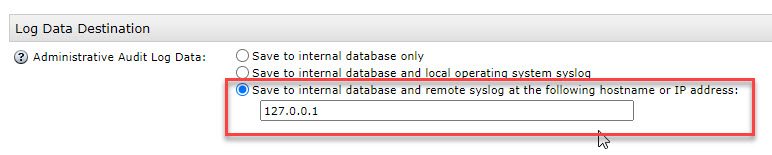
Step 12: In the Security Console, configure logging to send to localhost:
Navigate to Administration > Logging > Remote Syslog and set the syslog destination to
127.0.0.1.Step 13: Verify that logs are reaching the remote syslog servers by monitoring outbound traffic on port 514.
To monitor all traffic on port 514:
tcpdump -nvv -i eth0 port 514To monitor traffic to a specific syslog server:
tcpdump -nvv -i eth0 "dst host <syslog-server-IP> and dst port 514"Confirm that log packets are being sent from the Authentication Manager appliance to each configured syslog server IP.
Step 14: Repeat Steps 1–12 on each replica server in your deployment.
⚠️ CAUTION: Complete all steps on one instance before moving to the next. Do not apply changes to multiple servers simultaneously.
Notes



