How to Generate a Fixed Passcode Users Report in the Authentication Manager 8.x Security Console
Originally Published: 2014-11-06
Last Modified: 2026-07-22
Article Number
Applies To
RSA Product/Service Type: Authentication Manager
RSA Version/Condition: 8.x
Issue
A fixed passcode is a static password that can be assigned to a user in Authentication Manager as a temporary or emergency authentication method. As part of routine security audits or compliance reviews, administrators may need to identify all users in the Authentication Manager database who currently have a fixed passcode assigned — for example, to revoke unnecessary fixed passcodes or verify that their use complies with organizational policy.
Prerequisites:
- Access to the Security Console on the primary Authentication Manager server.
- An administrative account with privileges to create and run reports.
Resolution
To generate the report,
- Log in to the primary Authentication Manager Security Console with an administrative account that has privileges to create and run reports. .
- Navigate to Reporting > Reports > Add New.
- Select the All Users report template and click Next.
- Enter a report name, such as All Users report - users with fixed passcodes.
- Set the Has Fixed Passcode input parameter to Yes.
- Click Save.
- Left-click the report name and select Run Report Job Now.
- Click Run Report.
- The report is added to the job schedule:
- Click the Complete tab to access the completed report. Depending on the number of rows in the report it may take a while for the report to complete.
.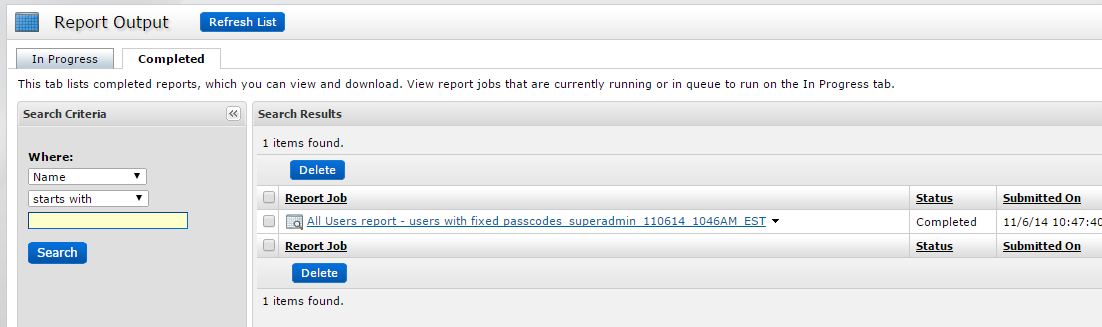
- Left-click the report name and select an option to either view the report in the browser or download the report in either CSV, XML or HTML format.
Verification: Confirm the report results display only users who have a fixed passcode assigned. Every user listed should show Yes in the Has Fixed Passcode column



