- RSA Authentication Manager
- RSA Cloud Access Service
- RSA Governance & Lifecycle
Your technical support engineer will ask for the RSA product serial number when you open a support case because it helps us support you more quickly and effectively.
The serial number allows us to:
- Confirm active maintenance and support coverage. It lets us verify that the product is covered under a current support or maintenance agreement for your account.
- Identify the exact system with which you are working. This helps us quickly understand which product and deployment the issue applies to and route your case to the right team.
- Check licensing and entitlements. We can see which features and capacities are licensed, which can be important when troubleshooting.
- Enable faster and more accurate case routing by immediately identifying the exact product and deployment, allowing the case to be assigned to the appropriate support team and subject‑matter experts without delay.
- Review relevant history. The serial number helps us access any past cases or known issues related to that specific system.
Providing the serial number up front helps avoid delays and allows us to focus right away on resolving your issue.
Follow the steps for your product to capture its serial number information.
RSA Authentication Manager
The instructions below explain how to locate the serial number for Authentication Manager.
- Access the RSA Security Console using URL of https://<fully_qualified_computer_name_of_the primary>:7004/console-ims or https://<fully_qualified_computer_name_of_the_primary>:7004/sc.
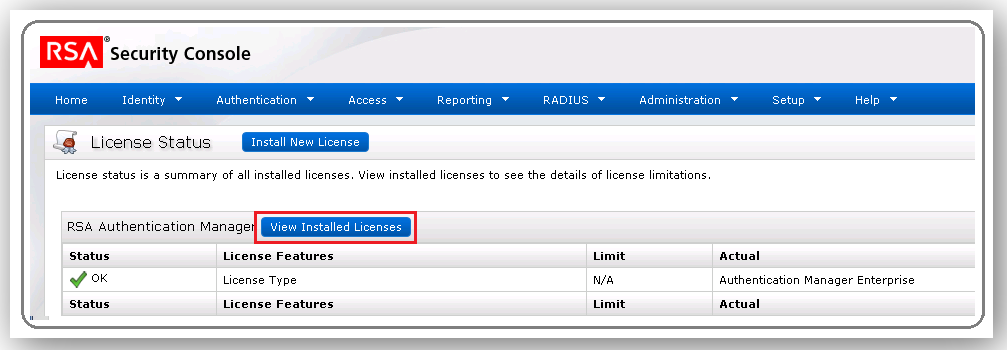
- Navigate to Setup > Licenses > Status.
- Click View Installed Licenses. This shows the License ID number (also known as the LID). This is not the Authentication Manager serial number. See the Notes section below for detail on the differences between the product serial number vs. license ID number.
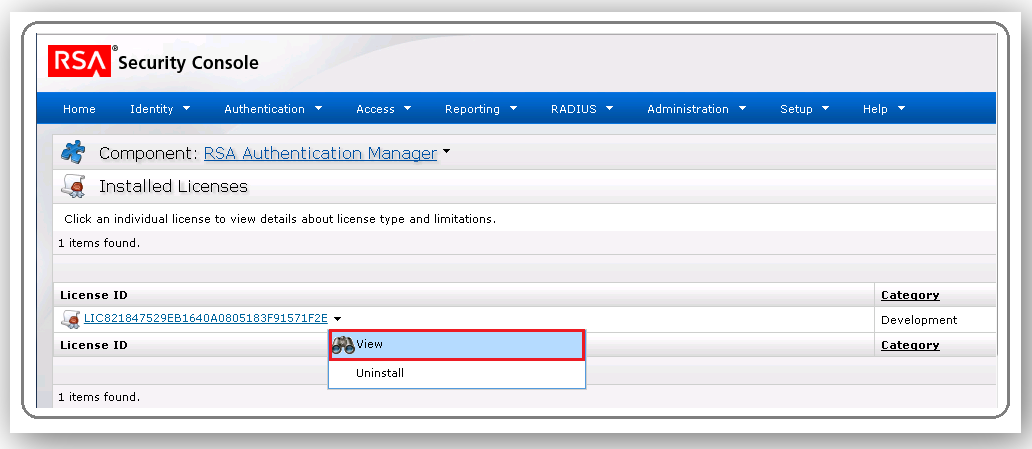
- Now click the drop down arrow next to the License ID number and click View.
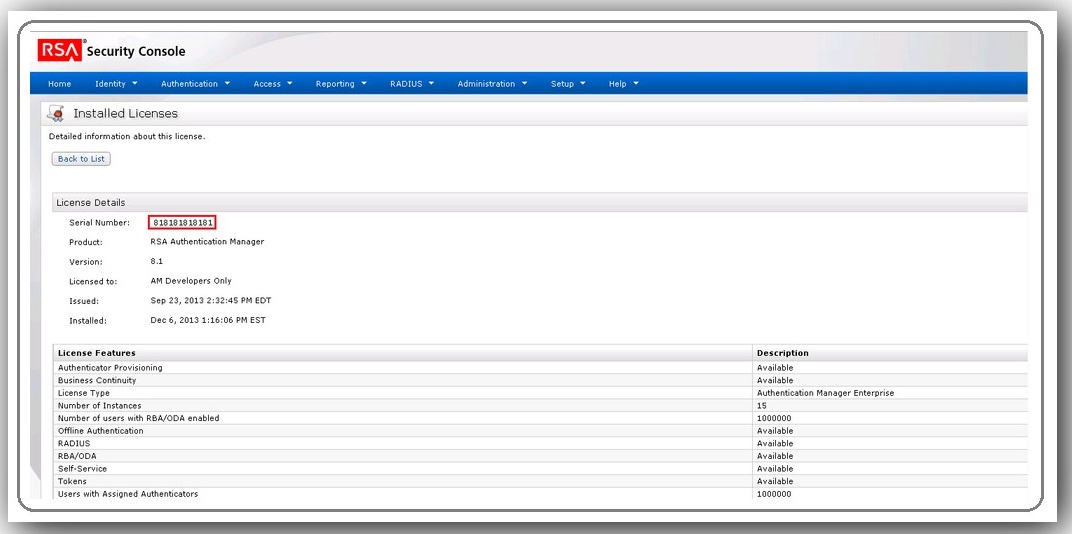
- The serial number and other information show under License Details. The serial number will begin with a 5 (5xxxxxxxxxx) or an 8 (8xxxxxx).
If the super administrator cannot login to the Security Console, use the steps outlined in this article to obtain the RSA Authentication Manager license serial number from the CLI.
RSA Cloud Access Service
The instructions below explain how to locate the serial number for your RSA Cloud Access Service (CAS) tenant.
- Log on to the Cloud Administration Console for your CAS tenant.
- Navigate to My Account > Company Settings.
- On the Company Information tab, capture the Customer Site ID.
RSA Governance & Lifecycle
The instructions below explain how to locate the serial number for your deployment of RSA Governance & Lifecycle:
Please refer to your order confirmation email to obtain information required when you open a support case. The email will include your serial number, contract number or site ID.
What is the difference between the serial number and the license ID?
The Authentication Manager serial number and the License ID (LID) that both display in the Security Console are different identifiers and are not interchangeable.
- The serial number identifies your customer account and, as of this writing in October 2026), starts with 5 or 8. This serial number is the same for every license installed in the specific deployment. RSA Customer Support uses this value to confirm maintenance coverage.
- The license ID (LID) starts with the letters LID and identifies one specific license file, so your deployment has one LID for each license you've installed. In the Security Console, the View Installed Licenses list shows only LIDs. To see the serial number, click the drop-down arrow next to any LID, click View, and look under License Details.
- This happens if you stack multiple license purchases. We can see this in the example of a customer named Gizmo, Inc. purchasing a license for 1,000 users. Their serial number for their deployment is 81xxxxxxxx and the license ID for the serial number is LID000yyyyyyyy. Gizmo, Inc. later purchases another 2,000 users as a stackable license that part of the 81xxxxxxxx serial, but the LID for that second user purchase is shown as LID000zzzzzzzz.
- If Gizmo, Inc. purchases a new license as a full replacement license for 2,000 users, there will only be one LID displayed after the license is installed.
- When working a case with Support, please provide the Authentication Manager serial number not the license ID.



