How to restrict "reports" option on Certificate Operations workbench for vettors on Registration Manager
Originally Published: 2015-01-20
Last Modified: 2023-10-06
Article Number
Applies To
Issue
Tasks
( admin-type = admin ) -read$
( sn = /* ) !none?
This Web ACL can be tweaked slightly to ALLOW some vettors to be able to access 'reports' operation, for example:
( | ( admin-type = admin ) ( md5 = <md5-of-vettor-who-should-have-access>) ) -read$
( sn = /* ) !none?
Resolution
1. Generate two new vettor certificates for RRM. RRM administrator is required to update the Web ACLs (/, /ra/, /scripts/) on RRM to allow the new vettor access to the admin interface. For example, if MD5 new vettor1 cert is f4bcc9134c92e8c0256b0470b0faa6ae and that for vettor2 is 758b2e7a80bf1723729dcf6034e00a1b, the Web ACLs are updated as follows:
a. Update ACL for / (screenshots before and after shown below):
b. Update ACL for /ra/ (screenshots before and after shown below):
c. Update ACL for /scripts/ (screenshots before and after shown below):
3. As an RRM administrator, create a new Web ACL for /ra/cert-ops/cert-report.xuda as shown below:
a. If ALL vettors should NOT have access to 'reports', create the new Web ACL with two rules as follows:
( admin-type = admin ) -read$
( sn = /* ) !none?
The Web ACL on RRM admin interface should look like the following:
b. If only some, but not all, vettors should have access to 'reports', create the new Web ACL with two rules as follows:
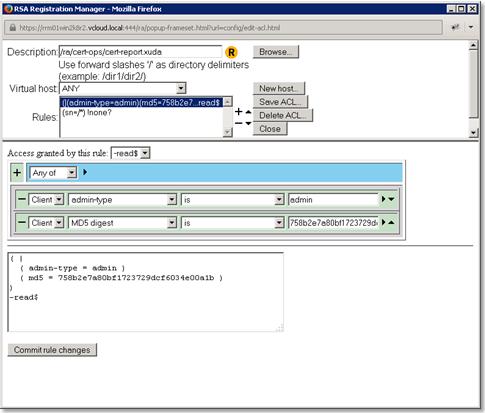
NOTE: When creating each new rule for the ACL, you can copy the string “( admin-type = admin ) -read$”, and similarly “( sn = /* ) !none?”, directly in the text box just above the button ‘Commit rule changes’.( | ( admin-type = admin ) ( md5 = <md5-of-vettor-who-should-have-access>) ) -read$ ( sn = /* ) !none?
For example, say, only vettor2 (created in step #1) should have access but other vettors (including vettor1 should NOT have access), the Web ACL on RRM admin interface should look like the following:
4. Test with vettor1 cert, the vettor should NOT have access to 'reports'
5. Test with vettor2 cert, if step 3-b was followed then the vettor should have access to 'reports'
6. Test with an admin cert, 'reports' should work fine



