Offline days not downloading for RSA Authentication Agent 7.3.x for Windows after enabling Offline Authentication policy in RSA Authentication Manager 8.x
Originally Published: 2016-06-02
Article Number
Applies To
RSA Product/Service Type: Authentication Agent for Windows
RSA Version/Condition: 7.3.x and above, including 7.4.4
Issue
- Offline days are not downloading to the agent after enabling the Offline Authentication policy in RSA Authentication Manager 8.1.
- The Authentication Activity Monitor is displaying the following error message:
Offline Authentication Data Download Failed
- The activity key and description of this failed message are:
Offline Authentication Data Download Failed.
Offline Authentication data download requested by user <user ID> from agent <agent name> using token <token serial number> failed with error message "Failed to send day data."
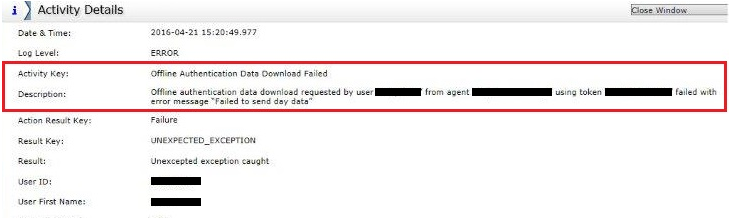
Offline Authentication data download requested by user <user ID> from agent <agent name> using token <token serial number> failed with error message "Failed to send day data."
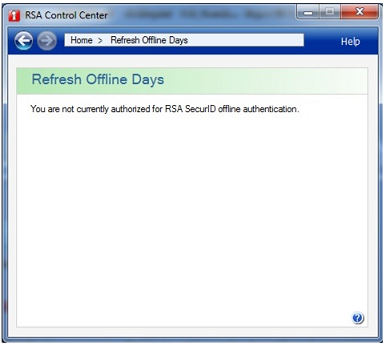
- On the workstation where the authentication agent installed, the RSA Control Center displays the message:
You are not currently authorized for RSA SecurID offline authentication.
Cause
- The Minimum Passcode Length does not match the value in the Offline Authentication Policy settings.
- The appropriate authenticators have not been selected.
- The appropriate code types have not been selected.
Resolution
- Login to the RSA Authentication Manager 8.1 primary server’s Security Console as a super admin user.
- Select Authentication > Policies > Offline Authentication Policy > Manage Existing.
- Determine if the Offline Authentication Policy which has been selected is the default policy.
- Edit the default policy by clicking on the drop down next to the policy and clicking Edit.
- Under Offline Authentication Security Settings, select the following options:
- Set the Minimum Passcode Length to 8 characters in length.
- Under Allow Offline Authentication Using, select the following options
- PINPad or Software Token
- PIN-less Token (doesn't require SecurID PIN)
- Under Offline Emergency Codes, ensure to select the below options in the Code Types:
- Offline Emergency Tokencodes
- Offline Emergency Passcodes
- Other settings can be left as the defaults or modified based on the requirement.
- Click Save.
- Try to authenticate and the offline days will download successfully
Notes
The main point of this article is the bottom of the screen shot above. If you set a minimum passcode above eight, and have PINPad style software tokens where the PIN is entered into the RSA SecurID software token app and added to the tokencode, you will have a problem if you forget to allow PINPad style, as your passcode will never be greater than eight digits.
However, you may also need to check that your 'good' policy is applied to the user who cannot download offline days. To do this,
- Go to Identity > Users > Manage Existing.
- Right click to display various options for that particular user.
- Confirm that the offline policy you want actually applies to this user. Sometimes the policy applies to the top level security domain and the user is in a subdomain that has a different policy.



