How to find the serial number or license key for RSA Authentication Manager, RSA Cloud Admin Console/Cloud Administration Service (CAS) and RSA Governance & Lifecycle
Originally Published: 2026-05-01
Article Number
Applies To
- RSA Authentication Manager
- RSA Cloud Admin Console/Cloud Authentication Service (CAS)
- RSA Governance & Lifecycle
Issue
We ask for your RSA product serial number when you open a support case because it helps us support you more quickly and effectively.
The serial number allows us to:
- Confirm active maintenance and support coverage. It lets us verify that the product is covered under a current support or maintenance agreement for your account.
- Identify the exact system with which you are working. This helps us quickly understand which product and deployment the issue applies to and route your case to the right team.
- Check licensing and entitlements. We can see which features and capacities are licensed, which can be important when troubleshooting.
- Enables faster and more accurate case routing by immediately identifying the exact product and deployment, allowing the case to be assigned to the appropriate support team and subject‑matter experts without delay.
- Review relevant history. The serial number helps us access any past cases or known issues related to that specific system.
Providing the serial number up front helps avoid delays and allows us to focus right away on resolving your issue.
Tasks
Follow the steps below to capture the serial number information:
RSA Authentication Manager
The instructions below explain how to locate the serial number for Authentication Manager.
- Access the RSA Security Console. (https://<fully_qualified_computer_name>:7004/console-ims).
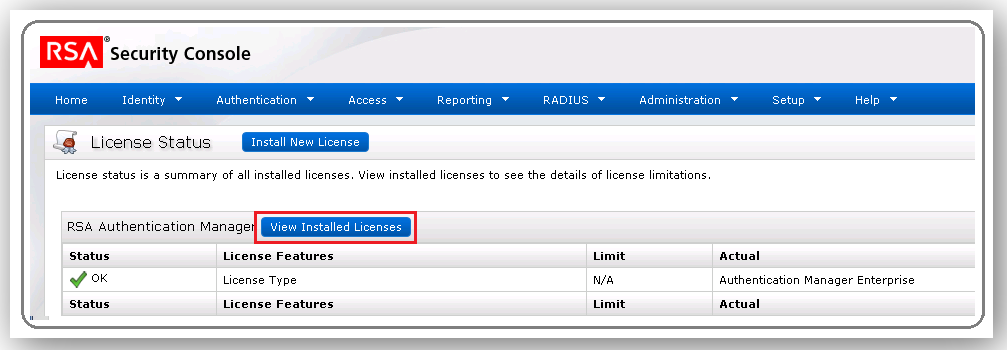
- Navigate to Setup > Licenses > Status.
- Click View Installed Licenses. This shows you the license ID number (also known as the LID. This is not the Authentication Manager serial number. Please move to the next step.
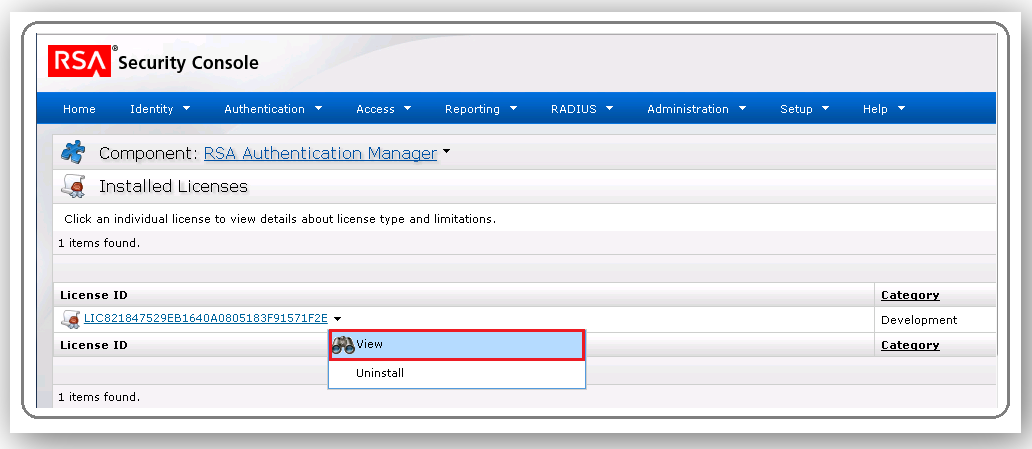
- Now click the small drop down arrow next to the License ID number and click View.
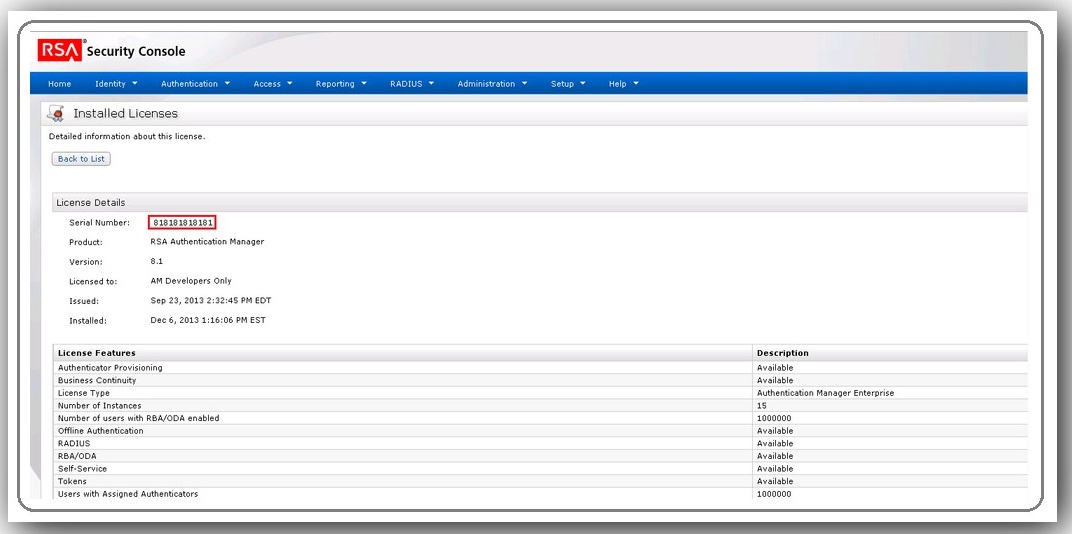
- The serial number and other information is displayed under License Details. The serial number will begin with a 5 (5000xxxxxxx) or an 8 (8xxxxxx).
RSA Cloud Admin Console/Cloud Administration Service (CAS)
The instructions below explain how to locate the serial number for your Cloud Admin Console/CAS tenant:
- Access your cloud tenant.
- Navigate to My Account > Company Settings.
- On the Company Information tab, capture the Customer Site ID.
RSA Governance & Lifecycle
The instructions below explain how to locate the serial number for your deployment of RSA Governance & Lifecycle:
Please refer to your order confirmation email to obtain other information required when your call RSA Technical Support. The email will include your serial number, contract number or site ID.



