How to configure High Availability (HA) on multiple RSA Authentication Agents for Citrix StoreFront with Risk Based Authentication (RBA)
Originally Published: 2016-10-20
Last Modified: 2026-06-03
Article Number
Applies To
RSA Product/Service Type: Authentication Agent for Citrix StoreFront
RSA Version/Condition: 1.0
Issue
This article reviews steps to configure the RSA Authentication Agent for Citrix StoreFront when configured in a deployment of RBA.
- Follow steps in How to increase chances for successfully implementing Risk Based Authentication on the RSA Authenticaiton Manager Citrix StoreFront agent
- How to increase the chances for successfully implementing RBA on the RSA Authentication Agent for Citrix StoreFront when there are multiple StoreFront servers for HA. For example, accounting for multiple Citrix StoreFront servers in the .js file.
- Configuring one agent record in Authentication Manager with alternate IP addresses and copies of the same node secret file so RBA requests are treated as if they come from one Citrix StoreFront agent.
Tasks
- Add a single authentication agent in the RSA Security Console, which uses one of the Citrix StoreFront IP addresses as the agent's primary IP, and the other StoreFront IP address(es) are listed as alternate or secondary IP addresses.
- Generate a single node secret for the Citrix StoreFront agent.
- Use the agent_nsload utility to load this node secret on each StoreFront agent in the HA cluster.
Resolution
Create an agent entry in Authentication Manager
- Login to the Security Console.
- Navigate to Access > Authentication Agent and choose Manage Existing or Add New.
- Create a new agent or edit the existing Citrix StoreFront agent, and enter one of the four IP addresses in the IP Address box so it is the main IP address.
- In the Alternate IP Addesses box, enter the other three Citrix StoreFront IPs as alternate IP addresses.
- Enter them one at a time and click Add.
- When done, click Save.
Generate a single node secret for the Citrix StoreFront agent
This single agent will need a node secret that can be shared on all four Citrix StoreFront agents.- From Authentication Agents page, click the dropdown on this newly edited Citrix agent and click Manage Node Secret.
- Check the option to create a new random node secret, and export the node secret to a file.
- Create an encryption password and confirm it. Note this password for later use.
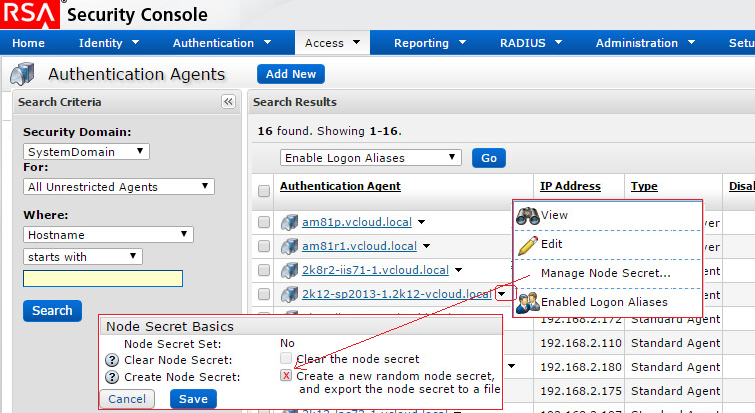
- Click Save.
- When the <agent_name>_NodeSecret.zip is ready, click Download Now.
- Inside the .zip will be a password-protected file named nodesecret.rec. Note: While the nodesecret.rec file is password protected, the zip file is not.
Load the node secret
- Make sure that agent_nsload.exe and the nodesecret.rec file are on the agent machine, in the ..\Program Files\Common Files\RSA Shared\Auth API directory.
- Run the following command. You may need to Run as Admin to do this, even for the command prompt, then the syntax is
C:\Program Files\Common Files\RSA Shared\Auth API> agent_nsload  -f .\nodesecret.rec  -d  "..\Auth Data"
Enter PASSWORD:  <enter the password created above>
Loading node secret . . . .
The Node Secret is successfully loaded
- The node secret is a file named securid that will be in the C:\Program Files\Common Files\RSA Shared\Auth Data directory, with the sdconf.rec file.
- Do a test or two from the RSA Control Center on the Citrix StoreFront to verify successful authentication.
- Repeat steps 1 through 4 on the other StoreFront servers in the HA cluster.



