Obtain the RSA root CA certificate from RSA Authentication Manager 8.x
Originally Published: 2016-01-17
Article Number
Applies To
RSA Product/Service Type: Authentication Manager
RSA Version/Condition: 8.x
Issue
Resolution
There are two methods that can be used to obtain the Authentication Manager instance RSA root CA certificate. The easiest approach for an administrator to obtain the self-signed RSA root CA certificate is by using a supported web browser.
UI Steps
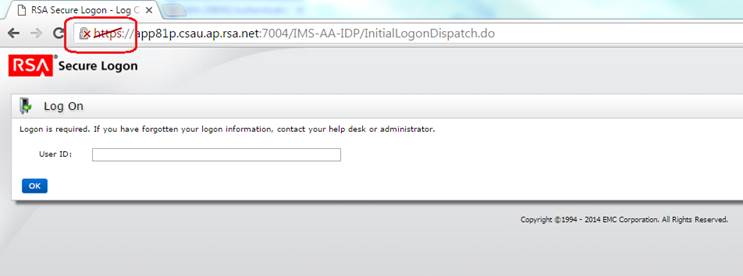
- Access either the Operations Console or Security Console with a web browser (using Google Chrome for this example).
- Click the padlock with the small red cross.
Example:
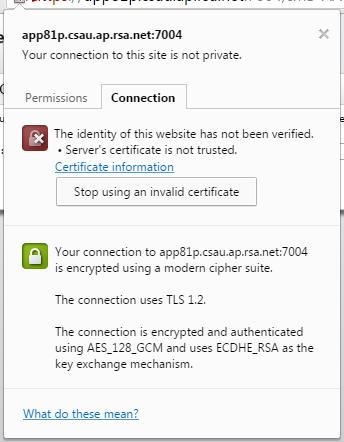
- The administrator is presented with the option to view the certification. Click the Certificate information link
- The server certificate is displayed:
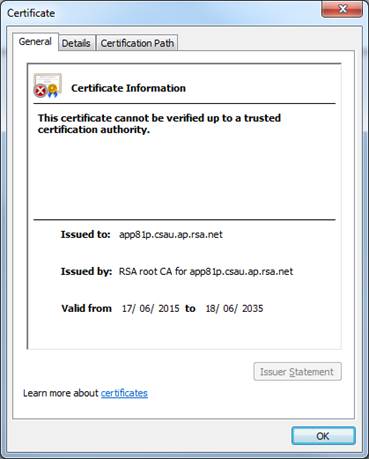
- Click the Certificate Path tab and select the RSA root CA certificate.
- Click View Certificate.
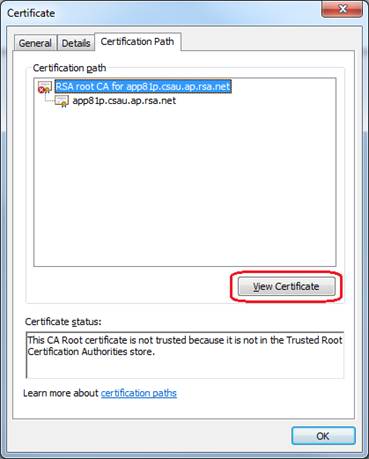
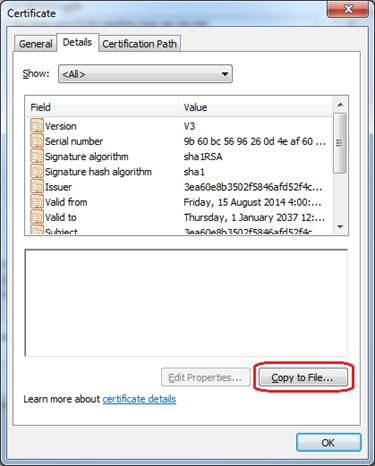
- After viewing the RSA root CA certificate click the Details tab.
- Click Copy to File… to save the certificate to a file.
- At the Certificate Export Wizard, click Next.
- Select a format you want to use (leaving the default for this example) and click Next.
- Enter a file name and click the Next.
- Click Finish.
- A confirmation appears:
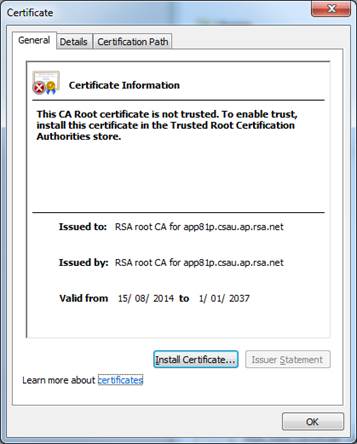
- In Windows Explorer double click the C:\RSA_root_CA.cer and the RSA root CA certificate is displayed:
Alternatively an administrator can access the operating system and export the RSA root CA certificate from the /opt/rsa/am/server/security/caStore.jks file.
SSH Steps
- How to SSH to an RSA Authentication Manager version 8.x server
- Launch an SSH client, such as PuTTY.
- Login to the primary Authentication Manager server as rsaadmin and enter the operating system password.
Note that during Quick Setup another user name may have been selected. Use that user name to login.
- Enter the following command and the keystore password when prompted:
login as: rsaadmin
Using keyboard-interactive authentication.
Password: <enter operating system password>
Last login: Thu Jan  9 18:06:47 2020 from jumphost.vcloud.local
RSA Authentication Manager Installation Directory: /opt/rsa/am
- Navigate to /opt/rsa/am /utils.
- Viewing the contents or exporting data from caStore.jks requires the Root Certificate Keystore File Password. Run ./rsautil manage-secrets -a listall to get the Root Certificate Keystore File Password:
rsaadmin@am82p:~> cd /opt/rsa/am/utils/
rsaadmin@am82p:/opt/rsa/am/utils> ./rsautil manage-secrets -a listall
Please enter OC Administrator username: <enter Operations Console administrator name>
Please enter OC Administrator password: <enter Operations Console administrator password>
Root Certificate Keystore File Password ...............: BB3aNkbU4uaEoNbURuTmnp5d7Kcuna
- To list the contents of the caStore.jks file use the following command:
rsaadmin@am82p:~>/opt/rsa/am/appserver/jdk/bin/keytool -export -keystore /opt/rsa/am/server/security/caStore.jks
Enter keystore password: <enter Root Certificate Keystore File Password from step 6>
- To export the RSA root CA certificate (with alias rsa_ca_am) use the command :
rsaadmin@am82p:/opt/rsa/am/utils> /opt/rsa/am/appserver/jdk/bin/keytool -export -alias rsa-am-ca -file rsa-am-ca.crt -keystore /opt/rsa/am/server/security/caStore.jks
Enter keystore password: <enter Root Certificate Keystore File Password from step 6>
- Use a secure FTP client (where SSH access to the operating system has been enabled) to copy the rsa-am-ca.crt file from the Authentication Manager instance.



