Understanding status LEDs for the RSA SecurID hardware appliance
Originally Published: 2019-08-02
Last Modified: 2023-10-06
Article Number
Applies To
RSA Product/Service Type: Hardware Appliance
RSA Version/Condition: 8.x
Issue
Resolution
Dell PowerEdge R210
Front Panel
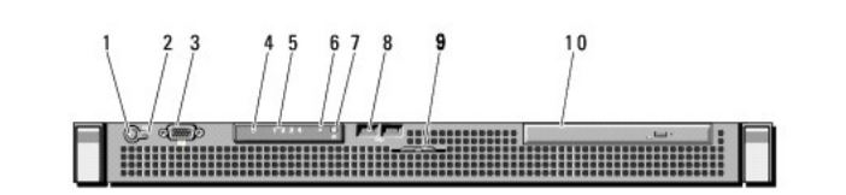
LED 6 (System Status Indicator)
- Lights are blue during normal system operation.
- Lights are amber when the system needs attention due to a problem.
Back Panel
LED 9 (System Status Indicator)
- Lights are blue during normal system operation.
- Lights are amber when the system needs attention due to a problem.
Dell PowerEdge R710
Front Panel
LED 7 (LCD Panel)
- The LCD lights are blue during normal system operation.
- The LCD lights are amber when the system needs attention.
- The LCD panel displays an error code followed by descriptive text.
Intel S1200BT/BTL
Front Panel
LED G (Status/Fault LED)
- Lights are amber when the system encounters a hardware error.
Intel S2600GZ/GL
Front Panel
LED F (Status/Fault LED)
- Lights are amber when the system encounters a hardware error.
Dell PowerEdge R230
Front Panel
Section 5 (Diagnostic Indicators)
- One of the LEDs is the Health Indicator (looks like a heartbeat). The indicator turns solid blue if the system is in good health.
- The indicator flashes amber when the system is powering on, the system is in standby or If any error condition exists.
Dell PowerEdge R630
Front Panel
LED 9 (LCD panel)
- The LCD turns blue during normal system operation.
- When the system needs attention, the LCD turns amber and the LCD panel displays an error code followed by descriptive text.
Notes
To understand the meaning of the LED indicators for the hard drives, but not for the whole appliance, review 000038912 - Understanding hard drive LEDs for Dell PowerEdge-based RSA SecurID hardware appliances.



