Reset the token PIN in the RSA Authentication Manager 8.x Self-Service Console when the existing PIN is forgotten
Originally Published: 2018-08-10
Article Number
Applies To
RSA Product/Service Type: Authentication Manager
RSA Version/Condition: 8.x
Issue
Tasks
- From the Security Console, click Setup > Self-Service Settings.
- On the Settings page, under Customization, click Enable or Disable Self-Service Features.
- Under Set Display Options for Troubleshooting, select Display I forgot my PIN option.
- Click Save.
Resolution
- Login to the Self-Service Console.
- Click on Troubleshoot.
- Click the I forgot my PIN option and click OK.
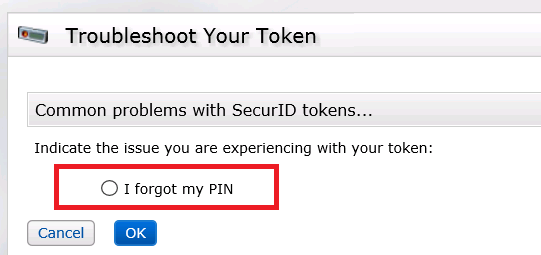
- When prompted, create and confirm the new PIN then click OK.
- Test the token and new PIN by entering your user name and passcode then click Test.
Notes
- This solution only works for RSA SecurID software and hardware tokens.
- Refer to the article on How to Set the Authentication Method for the Self-Service Console .

Related Articles
RSA Card Reset Utility unable to unlock/reset SmartCard PIN 115Number of Views RSA Via Lifecycle and Governance access control setting for web services gets reset to default on server restart 90Number of Views Cannot log on to Microsoft Windows 8.1 with RSA Authentication Agent 7.3.x for Windows after Windows update is applied usi… 56Number of Views How to configure an RSA Authentication Manager 8.1 server to accept a system-generated PIN when a token is in new PIN mode… 286Number of Views How to reset table views to their original factory-set (OOTB) defaults in RSA Identity Governance & Lifecycle 33Number of Views
Trending Articles
Downloading RSA Authentication Manager license files or RSA Software token seed records Unable to login to RSA Authentication Manager Security Console as super admin RSA Authentication Manager 8.9 Release Notes (January 2026) How to manipulate imported RSA SecurID Software Token(s) on an iPhone or iPad device Connection fails to Cloud Authentication Service when connecting through a proxy server from RSA Authentication Manager to…
Don't see what you're looking for?